Welcome, Amplify Reading families
Welcome to the Amplify Reading Caregiver hub. We are here to support you and your child with all things Amplify!

Welcome to Amplify Reading!
Welcome to Amplify Reading! We know how important—and challenging—it is for parents and caregivers to support kids’ remote learning. That’s why we are here to support you. On this site, you’ll find valuable information and resources to help you guide your child as they use Amplify Reading.
What is Amplify Reading?
Amplify Reading provides your child with the opportunity to learn and practice literacy skills within an engaging story world that adapts to each student as they move through the program. Your child can learn with Amplify Reading during school hours and independently at home.
Learn about Amplify Reading in middle school here.
What is my role in Amplify Reading?
Ensuring your child can log in independently
We recommend that caregivers assist their children by helping them log in at home. Below, you’ll find a step-by-step video on how to log in to the program with the login information or QR code provided by your child’s teacher.
Note that your child may log in via Clever or another platform. Reach out to your child’s teacher if you’re unsure or did not receive login information.
Watch the video below for an overview of how to get your elementary schooler started with Amplify Reading:
How to get your child started with Amplify Reading
Tips
- Practice logging in with your child consistently until they can log in independently.
- Keep your child’s login information in a single place so they know where to go if they forget it!
Giving your child the time and space to play independently
Amplify Reading is personalized to your child’s needs, so you do not need to assist students with their learning. Once your child can log in, they’re ready to start using the program. Students will need headphones or to be in a quiet place when they play.
Some students will begin with a placement Quest. Their answers help the Amplify Reading program match them to the best content and games for their reading skill levels. To ensure the most accurate placement, it is important that your child complete each activity independently. If your child needs help understanding the instructions, you can refer to this instruction guide. And it is always helpful to encourage your child to have fun and do their best!
We recommend reviewing this Protecting Kids Online article by the Federal Trade Commission addressing digital safety.
Joining in on the fun!
Each child in grades K–3 has a customizable companion called a Curioso. Print these Curioso Coloring Pages so your child can design their own!
Students in grades K–5 encounter eReader texts along their adaptive learning path. These texts give students the opportunity to transfer the skills they practice in the games to actual texts. Consider watching the following read aloud videos with your child for some extra exposure to the texts and skill transfer activities, as well as opportunities for discussion.
Hedgehog and Fox – Fox keeps taunting Hedgehog that he can beat him in a race. But Hedgehog may have a trick up his sleeve that Fox doesn’t know about…
Lifting Up the Sky – A Snohomish legend that explains how the constellations came to be in the sky.
The Best Present – Anjali and Anuj try to find Mom the best birthday present while they’re at a baseball game. What will they choose?
The Big Ride – Rosa and her dad are about to go on a roller coaster, but Rosa is a little frightened. Will she enjoy it after all?
The Busy Wolf – The Big Bad Wolf wasn’t trying to be bad, he was just too busy! Join us in Bookerton to hear this spin on classic fairy tales and engage with embedded skill practice and discussion prompts!
The Day They Became Americans – Three students who were born in different countries come together on a special day when they become American citizens.
Knowing where to go for help
Whether you have questions about your technology or want to know more about the program, Amplify’s Support Team is here to help!
Contact Support via telephone at (833) 97-Care-8 (833-972-2738) or caregiver@amplify.com.
Our support hours are Monday through Friday, 7 a.m. to 9 p.m. ET.
Frequently asked questions for caregivers
We recommend that your child use Amplify Reading two to three times per week for a weekly total of 30-45 minutes. However, your child’s teacher might have different daily or weekly recommendations.
If your child is having trouble with the content, Amplify Reading will adapt to provide your child with additional support and instructions within the game. For this reason, it is not recommended that caregivers help their child. While this can be hard, the program is carefully designed to provide the level of support your child needs to move forward.
If your child is having any technical challenges, please contact Amplify customer support at (833) 972-2738 or caregiver@amplify.com from Monday – Friday, 7 a.m. – 9 p.m. EDT and Saturday – Sunday from 10 a.m. – 6 pm. EDT.
We’re excited that you want to learn more! This recorded webinar for caregivers provides a deeper dive on the program and how you can support your child.
Oregon ELA Review for Elementary (K–5)
mCLASS®: Boost Reading Edition for Arkansas
Dear Arkansas educational leaders,
We’re honored that you’re reviewing mCLASS: Boost Reading Edition for use with students in grades K-5. One of the challenges of managing a classroom is the need for a single teacher to make sure every student consistently receives the right level of attention and practice in the right areas with limited class time. mCLASS: Boost Reading provides students with personalized instruction, so students can move through the program’s learning map along their own unique pathway which adapts based on individual student performance. /span>
On this site, you’ll find instructions for how to sample instructional content and access additional resources cited in our response.
You can also review the full scope and sequence and the standards alignment for more on the program’s content coverage, and the program guide for insights into the research-base for mCLASS: Boost Reading. You can also access the DIBELS 8th Edition Administration and Scoring Guide to learn more about its measures and implementation.

Sample instructional content
Boost Reading instruction comes in the form of interactive skill games, vocabulary practice, close reading lessons, and opportunities to apply all of these skills in authentic texts in an eReader. Teachers receive key insights into student performance across these activities. Follow the instructions below to access sample data and content.
Interactive skill games and close reading lessons
Step 2
Log into demo
Click LOG IN WITH AMPLIFY. Then use one of the usernames below to enter the demo site. The password for each account is: “Amplify1-arkansas1”
t1.arkansas1@demo.tryamplify.net
t2.arkansas1@demo.tryamplify.net
t3.arkansas1@demo.tryamplify.net
t4.arkansas1@demo.tryamplify.net
Step 3
Explore student experience
Tap STUDENT EXPERIENCE at the bottom of the page, and then tap CONTINUE to get started. This initiates the grades 4–5 game world. This is where students play independently and work through an adaptive game sequence.
Step 4
Enter the game library
For review purposes, our game library allows you to explore all games in any order. To access the game library, click the THREE DOTS at the top right hand corner of the screen.
Step 5
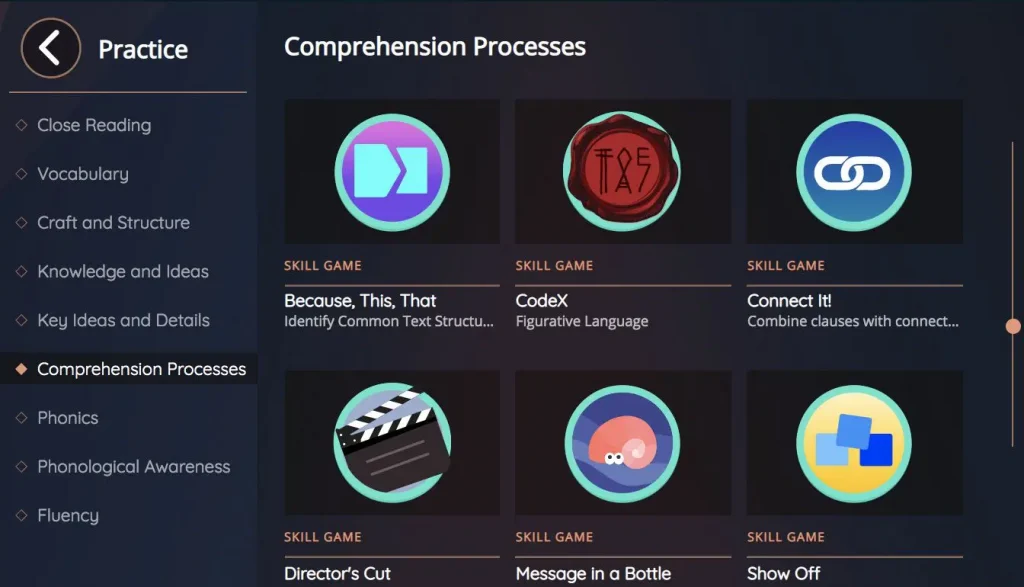
Find a game
Games are organized by skill domain and listed alphabetically. Scroll to view more games.
Step 6
Play a game
Tap the game you wish to play. On the opening page of the game, you’ll find tiles with numbers on them that reflect the game’s level. Scroll using the right arrow to see additional levels and choose the level you wish to play.
Step 7
Explore more games
Tap the arrow at the top left of the screen when you’re ready to sample a different skill game or close reading lesson.
Tip
Since games grow progressively more challenging, consider exploring the first and last level of a particular game to see the full range of skill practice.
Application of skills to text in the eReader and the Vocabulary App

Sample data and teacher-led instructional resources

Step 2
Log in to demo
Click LOG IN WITH AMPLIFY. Then use one of the usernames below to enter the demo site. The password for each account is: “Amplify1-arkansas1”
t1.arkansas1@demo.tryamplify.net
t2.arkansas1@demo.tryamplify.net
t3.arkansas1@demo.tryamplify.net
t4.arkansas1@demo.tryamplify.net
Step 3
Select the ‘Reading’ icon
This will bring you to a screen without data, as your “class” has not played Boost Reading. To see a demo class and sample data, tap EXPLORE DEMO.
Step 4
Select your role
From this screen, select your role. Then select the 4–5 grade band and tap LAUNCH DEMO (you can switch grade bands at any time). This will bring you to a view of sample class data for the grade band that you selected.
Step 5
Tour icon
We recommend you tap the TOUR icon in the top right corner for an overview of the Teacher Dashboard.
Tip 1
Class Data
You can also view data for the full sample class via the STUDENTS tabs.
Tip 2
Student Data
To dive into more detail about an individual student, tap on the student’s name from either the INSIGHTS or STUDENTS tab.
Tip 3
Resource Library
To review our teacher-led instructional resources (used to reteach skills and concepts where students demonstrate difficulty), click the RESOURCE LIBRARY tab at the top of the page.
Contact us
Support is always within reach. Our team is dedicated to supporting Arkansas classrooms and can be reached any time via email or phone.